CO2 Laser Marking for Non-Metal Products
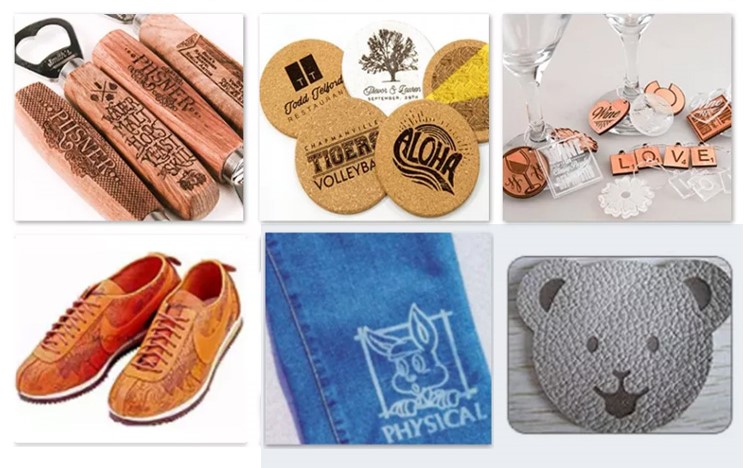
The RL-20C desktop CO2 laser marking machine marks text, logos, serial numbers and decorative patterns on materials such as wood, paper, leather and suitable plastics. Operators place each workpiece on the workbench and adjust the marking head to suit its height.
Typical applications include:
Wood products: Logos, lettering and decorative designs on wooden gifts and accessories.
Paper and cardboard: Product information, identification codes and branding on tags and packaging.
Leather goods: Logos and personalized designs on leather patches and accessories.
Selected plastics: Text and identification marks on compatible plastic parts.
Marking results depend on the material composition, surface finish and laser settings. Send us a sample or material details so we can check suitability and demonstrate the marking result.
Desktop Design for Everyday Marking
Workbench for Part Positioning
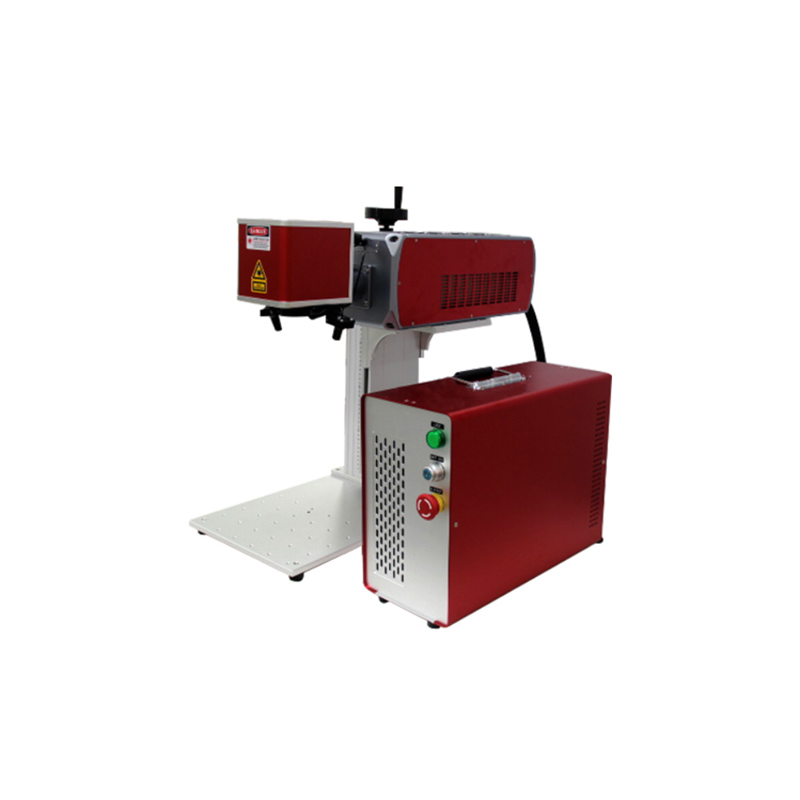
Place individual products on the workbench and position the marking area beneath the laser head. Fixtures can help locate parts when repeating the same marking job.
Adjustable Marking Height
Use the lifting handle to adjust the marking head for workpieces of different heights and set the working distance before marking.
Open Access for Loading
The open work area gives operators access to load, position and remove products, making it practical for jobs that require frequent changes between parts.
Lens Options for Different Marking Areas
Select a field lens to suit the size of your design. The marking area and detail requirements should be considered together when choosing the configuration.
Machine Configuration
Height Adjustment Handle
Adjusts the marking head vertically to set the working distance for workpieces of different heights.
Control Buttons
Provides access to machine controls for startup and operation.
Galvanometer Scanner
Directs the laser beam across the marking area to reproduce text, logos and graphics.
Field Lens
Focuses the laser onto the workpiece. Lens selection determines the available marking field and affects the focused spot size.
CO2 Laser Source
Generates the laser beam used to mark and engrave compatible non-metal materials.
Red Light Positioning
Provides a visible reference to help position the workpiece and check marking alignment before processing.
Support Column
Supports the marking head and provides a height scale as a reference when adjusting the working distance.
Aluminum Workbench
Provides a flat surface with mounting holes for securing fixtures and positioning workpieces for repeated marking jobs.
Technical Specifications
| Parameter | Specification |
|---|---|
| Model | RL-20C |
| Brand | Riselaser |
| Machine Type | Desktop CO2 Laser Marking Machine |
| Laser Type | CO2 |
| Laser Source Brand | Riselaser |
| Laser Power Options | 20W / 30W / 50W / 100W |
| Standard Marking Area | 110 × 110 mm |
| Optional Marking Areas | 150 × 150 mm / 200 × 200 mm / 300 × 300 mm, depending on lens configuration |
| Height Adjustment | Manual |
| Positioning | Red Light Positioning |
| Workbench | Aluminum |
| Applicable Materials | Wood, Paper, Leather, Fabric and Selected Plastics |
| Cooling Method | Depends on the selected laser source and power |
| Net Weight | Configuration dependent |
| Warranty | 1 Year |
| Technical Support | Online Support |
Shipping & Delivery
Delivery to Your Freight Forwarder
Already working with a freight forwarder in China? We can arrange delivery to their designated warehouse.
International Shipping
We can help arrange air or sea freight according to your destination and delivery requirements. Shipping costs and transit times are confirmed with the quotation.
Door-to-Door Delivery
DDP shipping may be available for your destination. Contact us to confirm service coverage and the charges included.
Send us your country, city and postal code for a shipping quotation.
Frequently Asked Questions
1. What materials can the RL-20C mark?
The RL-20C is designed for non-metal materials such as wood, paper, leather, fabric and selected plastics. Results vary with material composition and surface finish. Sample testing helps confirm the marking effect on your product.
2. How do I choose between 20W, 30W, 50W and 100W?
The choice depends on your material, design size, required marking depth and production volume. Send us your product details and an example of the result you want. We can recommend a power option based on testing.
3. What is the difference between a desktop and a flying CO2 laser marking machine?
A desktop machine marks workpieces positioned on its workbench. A flying marking machine works with a production line to mark products as they move. The desktop RL-20C suits individually loaded parts and jobs that require changes between products.
4. Can I choose a larger marking area?
Yes. The standard marking area is 110 × 110 mm, with optional lens configurations for 150 × 150 mm, 200 × 200 mm and 300 × 300 mm. A larger marking field changes the focused spot size, so lens selection should also account for the detail required in your design.
5. Can you test my product before I order?
Yes. You can send samples for marking tests. Please include the material details, marking artwork, required dimensions and a reference for the finish you want. We can share photos or videos of the results for your review.
6. What training and after-sales support do you provide?
We provide an English user manual, operation videos and online guidance for machine setup and marking adjustments. The machine comes with a one-year warranty. Please refer to the quotation for warranty coverage and terms.