
When choosing the best laser engraver for small business, the golden rule of material compatibility is very simple. Fiber is for metals; CO2 is for wood and acrylic; UV is for plastics and glass. You cannot buy one single laser that perfectly marks every material.
Here is the definitive breakdown of fiber vs CO2 laser and UV technologies to help you choose the right machine and scale your custom laser engraving production.
Technology Types (Fiber / CO2 / UV)
Fiber Lasers: The Metal Master
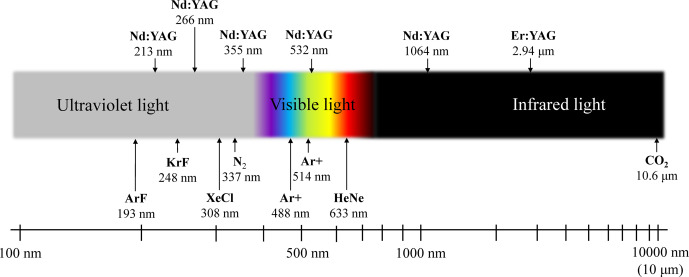
Fiber lasers use a 1064 nm wavelength that absorbs perfectly into metal. They are the top choice for deep engraving, black annealing, and fast serial number marking on stainless steel, aluminum, brass, and titanium. Because they use solid-state parts, fiber lasers need zero maintenance, use no consumables, and can last up to 100,000 hours.
When picking a fiber laser, you have to choose between a Q-Switched and a MOPA machine. A Q-Switched fiber laser has a fixed pulse width, making it a great workhorse for deep, basic engraving. A MOPA laser, however, lets you adjust the pulse width (usually from 2 to 500ns). This adjustable heat control is what allows for black marking on anodized aluminum and high-contrast MOPA color marking on stainless steel.
CO2 Lasers: The Organics Workhorse
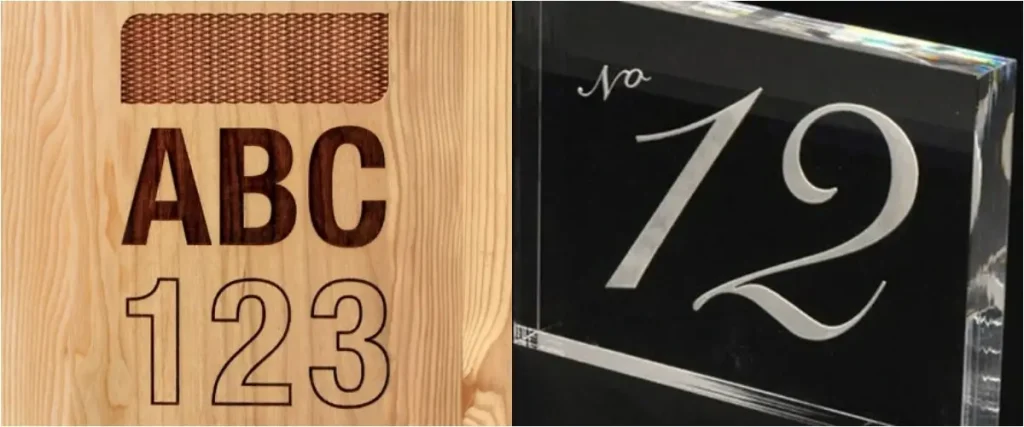
CO2 lasers operate at a 10.6 µm wavelength. This type of light is easily absorbed by organic materials and plastics. CO2 is the industry standard for custom laser engraving on wood, leather, paper, and clear acrylic. However, a CO2 laser cannot engrave bare metal. The beam simply bounces off the metal surface like a mirror unless you apply an expensive marking spray first.
UV Lasers: The Precision All-Rounder
Ultraviolet (UV) lasers use a 355 nm wavelength. They use a special process called “Cold Marking.” Instead of using intense heat to burn the material, the high-energy UV light breaks the molecular bonds directly. This means there is no heat damage or melting. Because it stays cool, UV is the only good technology for highly reflective precious metals, thin glass, and heat-sensitive plastics.
Laser Source vs. Material Guide
| Material | Fiber Laser (1064nm) | CO2 Laser (10.6µm) | UV Laser (355nm) |
| Bare Metals | Highly Effective (Deep engrave/anneal) | Ineffective (Reflects beam) | Effective (Cold surface mark) |
| Reflective Metals | Effective (High power required) | Ineffective | Highly Effective (No heat warp) |
| Wood & Leather | Ineffective (Burns/no contrast) | Highly Effective (Deep cut/engrave) | Effective (Surface marking) |
| Clear Acrylic & Glass | Ineffective (Passes through) | Highly Effective (Cuts/frosts) | Highly Effective (Micro-crack free) |
| Heat-Sensitive Plastics | Moderate (Risk of melt) | Moderate (High risk of burn) | Highly Effective (High contrast) |
Why Upgrade to Laser Marking?
If you are upgrading your shop, you might wonder how lasers compare to older tools.
First, lasers are cheaper to run over time. Compared to continuous inkjet (CIJ) printing, laser marking is completely permanent and requires zero ink or chemical consumables. Compared to a dot peen machine, a laser is much quieter and never physically touches the part, meaning it won’t bend or stress thin materials.
Small shops are also moving away from massive, open-frame machines and large conveyor belts. Today, the most popular choice is a Desktop Enclosed laser system. It offers high-speed industrial marking but fits safely on a standard workbench.
Industrial Applications and Standards
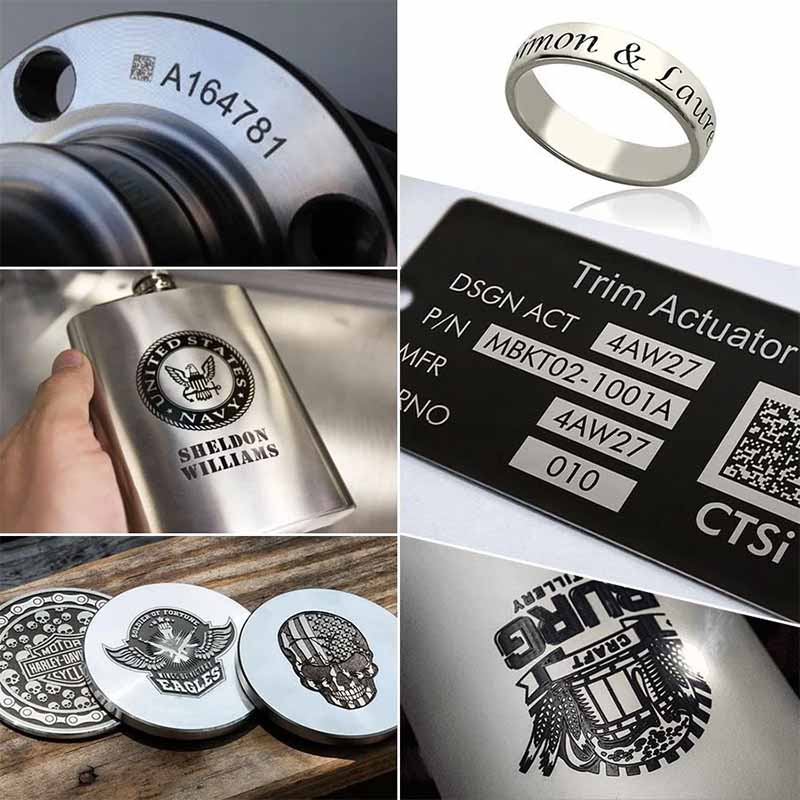
Whether you are a local gift shop or an aerospace supplier, your laser must be accurate.
A standard 20W fiber laser can easily mark a 10-digit serial number on aluminum in half a second with 0.01mm precision. Modern galvo scanner systems move the laser beam using tiny mirrors, reaching marking speeds of 7,000 mm/s to 10,000 mm/s.
For military and aerospace parts, markings must meet the strict MIL-STD-130 standard. This rule requires permanent marks that survive harsh weather and chemicals. To make sure scanners can read your codes perfectly, 2D QR codes and Data Matrix codes must follow the ISO/IEC 16022 standard.
Software, Control, and Optics
Advanced engraving requires good software like EzCad2, EzCad3, or LightBurn to map out your vector files (PLT/DXF).
Hardware setup is also key. You use a built-in red light pointer to line up your target, while a motorized z-axis helps you dial in the exact focal distance. Your marking area (like 70×70 mm or 110×110 mm) is determined by the F-theta lens on your laser. If you need a laser engraver for tumblers, you just plug a rotary attachment into the machine, and the software will spin the cup while the laser fires.
ROI and Maintenance
When figuring out the return on investment (ROI) for a small business, look past the initial price tag.
- The Tumbler ROI Math: Imagine you spend $6,000 on a great fiber laser and rotary setup. You buy blank tumblers for $10 each and sell them for $35. That gives you a $25 profit per cup. At that rate, you only need to sell 240 tumblers to completely pay off your machine. If you sell 40 a month, your laser pays for itself in just six months.
- Maintenance & Consumables: Fiber lasers are solid-state and air-cooled, meaning they are maintenance-free. On the other hand, UV lasers and glass-tube CO2 lasers require a water chiller to prevent overheating. Also, the special crystal inside a UV laser degrades over time and usually needs replacing every 10,000 to 15,000 hours.
Compliance, Safety, and Facility Integration
Running an open Class 4 laser in a small shop is a serious fire hazard and can damage your eyes. To stay safe without building a special laser room, you should buy a Class 1 Desktop Enclosed machine. These machines have safety doors that instantly shut off the laser if opened.
Even with safety doors, you must wear laser safety glasses during setup. Your glasses must match the laser’s wavelength. You need an optical density rating of OD 7+ @ 1064nm for fiber lasers, and OD 6+ @ 10600nm for CO2 systems. Finally, melting certain plastics (especially PVC) creates toxic smoke. You must hook up a HEPA fume extraction system to your enclosure to stay safe.
FAQ
A: No. The 1064 nm wavelength of a fiber laser passes straight through clear items without leaving a mark. You need a UV laser for glass, or a CO2 laser for acrylic.
A: A MOPA laser gives you full control over the pulse width and frequency. This extra control stops thin metals from warping, allows for clean black marks on anodized aluminum, and makes color marking on stainless steel possible.
A: Fiber lasers are basically maintenance-free and use no consumables. But CO2 and UV lasers require regular water chiller maintenance, and their source tubes or crystals will eventually need to be replaced.