Quick answer: For metal pens, a fiber laser marking machine is usually the best choice. A 20W–30W fiber laser is practical for most name and logo marking jobs. A 50W fiber laser is better for faster production, deeper marks, or larger batch orders. For DIY users or very small shops, a compact 5W mini fiber laser can be a low-cost starter option for simple metal pen marking. For wood pens, leather cases, acrylic boxes, and packaging, a CO2 laser engraving machine is usually more suitable. Plastic pens should be tested first because different plastics react differently to laser marking.
A laser engraving machine for pens is used to mark logos, names, serial numbers, QR codes, and custom designs on pen surfaces. The right system depends on the pen material, marking size, production volume, and whether the design needs to be marked on one side or around the pen body.
For most business users, the best starting point is a fiber laser marking machine with a flat pen fixture. If you need wraparound engraving or long text around the pen, you may also need a rotary attachment.
Need help choosing the right pen laser engraving machine? Send us your pen material, logo size, marking position, and daily quantity. We can recommend the suitable laser type, power, fixture, and rotary setup for your application.
What Is a Laser Engraving Machine for Pens?
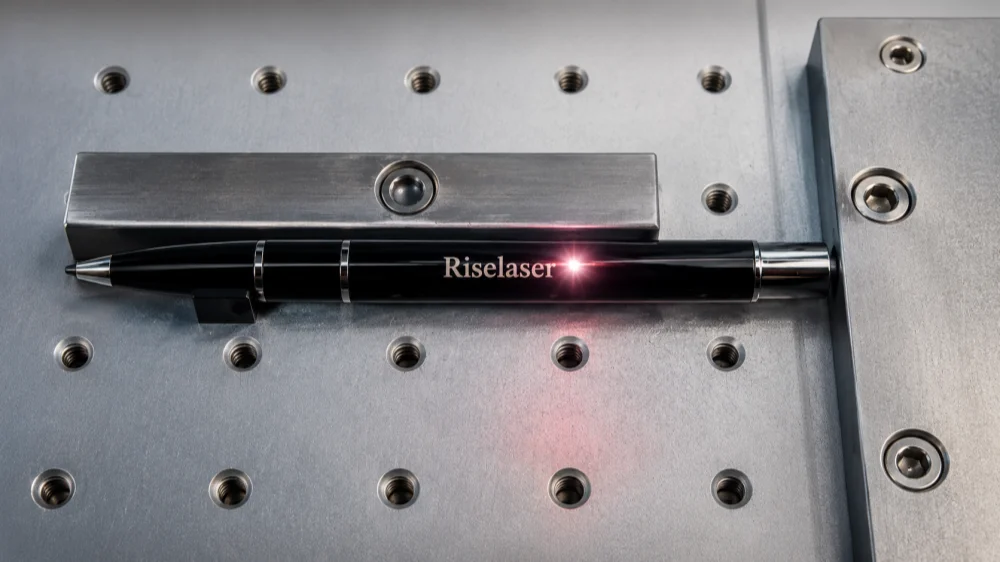
A laser engraving machine for pens is a machine that uses a focused laser beam to create permanent marks on pen surfaces. It can mark company logos, personal names, serial numbers, decorative patterns, and small text.
It is commonly used by:
- Promotional gift suppliers
- Custom pen sellers
- Corporate gift companies
- Small engraving shops
- Pen manufacturers
- Online personalization businesses
This type of machine is not the same as a small electric engraving pen. An electric engraving pen is a hand tool that scratches the surface by contact. It may work for simple DIY use, but it is slow and hard to control for repeat business orders.
A pen laser engraving machine is faster, cleaner, and more repeatable. It is a better choice when you need to mark the same logo or name on many pens.
Also, many people say “laser engraving,” but in the pen industry, the actual process is often laser marking. For most promotional pens, the laser does not need to cut deeply into the metal. It only needs to create a clean, permanent logo or name on the surface. You can learn more about this process in our guide: what is a laser marking machine.
Best Laser Type for Pen Engraving: Fiber, CO2, Diode, or UV?
The best laser type depends mainly on the pen material. Do not choose a machine only by wattage. Choose by material first.
| Pen Material | Best Laser Type | Need Testing? | Best Use Case |
|---|---|---|---|
| Stainless steel pen | Fiber laser | Low | Permanent logo, name, and serial number marking |
| Aluminum pen | Fiber or MOPA fiber laser | Medium | High-contrast logo and fine text marking |
| Coated metal pen | Fiber laser | Medium | Coating removal to reveal the base layer |
| Brass pen | Fiber laser | Low to medium | Clear logo and text marking |
| Anodized aluminum pen | Fiber or MOPA fiber laser | Medium | Sharp contrast and fine detail |
| Wood pen | CO2 or diode laser | Medium | Custom text and decorative engraving |
| Plastic pen | UV laser or sample testing | High | Plastic marking where heat control matters |
| Leather pen case | CO2 laser | Low to medium | Premium gift set personalization |
| Acrylic pen box | CO2 laser | Low to medium | Gift packaging engraving and cutting |
If your main product is metal pens, a fiber laser is the safest choice. If your products include wood pens, leather cases, acrylic boxes, and paper packaging, you may need a CO2 laser as well.
Not sure which laser works for your pen material? Send us the pen material, photos, logo size, and expected quantity. We can help recommend the right system before you buy.
Why Fiber Laser Marking Is Usually Best for Metal Pens
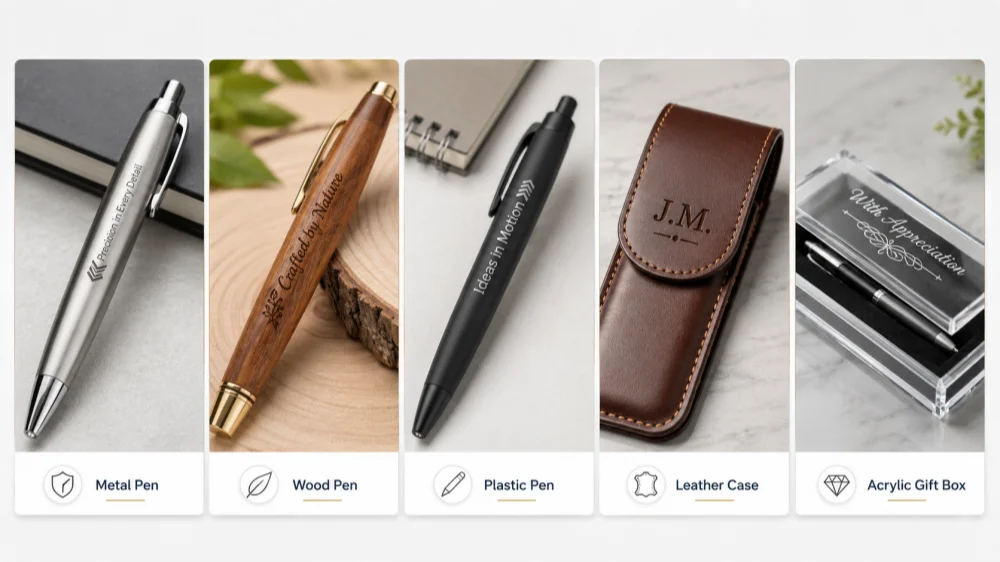
A fiber laser marking machine for pens is the best fit for most metal pen engraving jobs because it is designed for metal marking. It can create clean and permanent marks on many common pen materials.
Fiber laser can mark:
- Stainless steel pens
- Aluminum pens
- Brass pens
- Painted metal pens
- Coated metal pens
- Anodized aluminum pens
- Some plated metal pens
A fiber laser does not need ink, stickers, labels, or cutting tools. This is useful for promotional pens because the logo should stay clear after daily use.
For example, a company may need 500 black coated metal pens with a silver logo. A fiber laser can remove the black coating and reveal the metal layer underneath. This creates a clean contrast without printing ink.
Another example: a gift shop may need to engrave customer names on stainless steel pens. A fiber laser can mark each name clearly and keep the placement consistent.
Fiber Laser Marking vs Deep Engraving on Pens
For pen engraving, deeper is not always better.
Most customers care more about:
- Clear logo detail
- Good contrast
- Smooth surface finish
- Permanent marking
- Fast production
- Consistent position
Deep engraving takes more time. It may also create a rougher surface if the settings are not correct. For most promotional pens, surface marking or shallow engraving is enough. It looks professional and keeps production speed high.
Can One Machine Engrave All Types of Pens?
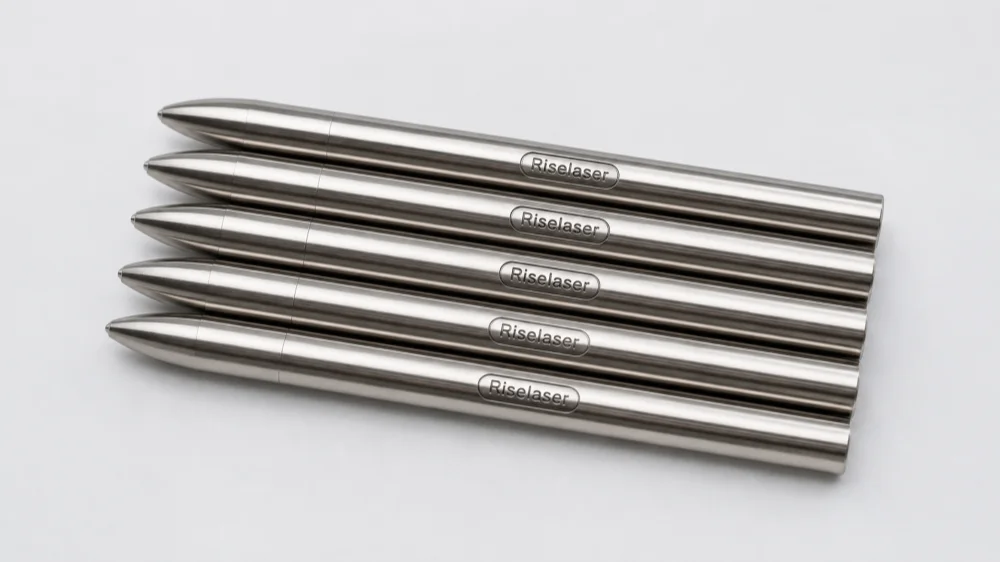
Not always. One laser machine may not be ideal for every pen material. This is one of the most common mistakes when buying a pen laser engraving machine.
A fiber laser is excellent for metal pens, but it may not be the best choice for wood, leather, or some plastics. A CO2 laser is good for organic materials, but it is not usually the best choice for bare metal pens.
Metal Pens
Metal pens are the best match for fiber laser marking. This includes stainless steel, aluminum, brass, coated metal, painted metal, and anodized aluminum.
For most metal pen businesses, a 20W, 30W, or 50W fiber laser can handle common logo and name marking. A compact 5W mini fiber laser can also mark simple logos or names, but it is better for DIY users or very small shops rather than daily batch production.
Wooden Pens
Wood pens are usually better for CO2 laser or diode laser engraving. The key is to control the power. Too much heat can burn the wood and make the engraving too dark.
If the pen has paint, oil, varnish, or a special coating, test before batch production.
Plastic Pens
Plastic pens are harder to judge. Some plastics mark well. Some melt, burn, turn yellow, or produce weak contrast. The same laser settings may work on one plastic pen but fail on another.
For plastic pens, sample testing is important. UV laser may be better for some sensitive plastics because it can reduce heat effect.
Leather Pen Cases and Gift Boxes
If you also engrave leather pen cases, paper boxes, or acrylic gift boxes, a CO2 laser is usually more suitable.
This is common for premium gift sets. A business may use a fiber laser for the metal pen and a CO2 laser for the leather case or packaging.
| Application | Better Laser Choice |
|---|---|
| Metal pen logo marking | Fiber laser |
| Metal pen name engraving | Fiber laser |
| Coated metal pen marking | Fiber laser |
| Wood pen engraving | CO2 or diode laser |
| Leather pen case engraving | CO2 laser |
| Acrylic gift box engraving | CO2 laser |
| Plastic pen marking | UV laser or sample test |
| Full gift set customization | Fiber + CO2 combination |
Do You Need a Rotary Attachment for Pen Engraving?
Pens are round, but not every pen engraving job needs a rotary attachment.
If you only engrave a small logo or name on one side of the pen, a flat pen fixture may be enough. If you need to engrave around the curved surface, then you need a rotary attachment.
When a Flat Pen Fixture Is Enough
A flat fixture works well when the mark is small and placed on one side of the pen.
Use a flat fixture for:
- Small company logo
- Customer name
- Short text
- One-side marking
- Batch marking in the same position
A flat jig can hold the pen steady and keep the marking position consistent. This is useful for batch orders.
When You Need a Rotary Attachment
A rotary attachment is useful when the design needs to follow the round shape of the pen.
Use a rotary attachment for:
- Full-wrap designs
- Long text around the pen
- Curved logo placement
- Large marking area around the pen body
- Cylindrical marking with better alignment
For small round objects like pens, a 3-jaw chuck rotary is often more stable than a simple roller rotary. It can hold the pen more firmly and reduce movement during marking.
| Engraving Need | Recommended Fixture |
|---|---|
| Small logo on one side | Flat pen jig |
| Name on one side | Flat fixture |
| Same logo on many pens | Multi-pen jig |
| Full-wrap design | Rotary attachment |
| Long text around pen body | Rotary attachment |
| Small cylindrical pen body | 3-jaw chuck rotary |
Tip: Send us your pen diameter, logo size, and marking position. We can help confirm whether you need a flat fixture or rotary attachment.
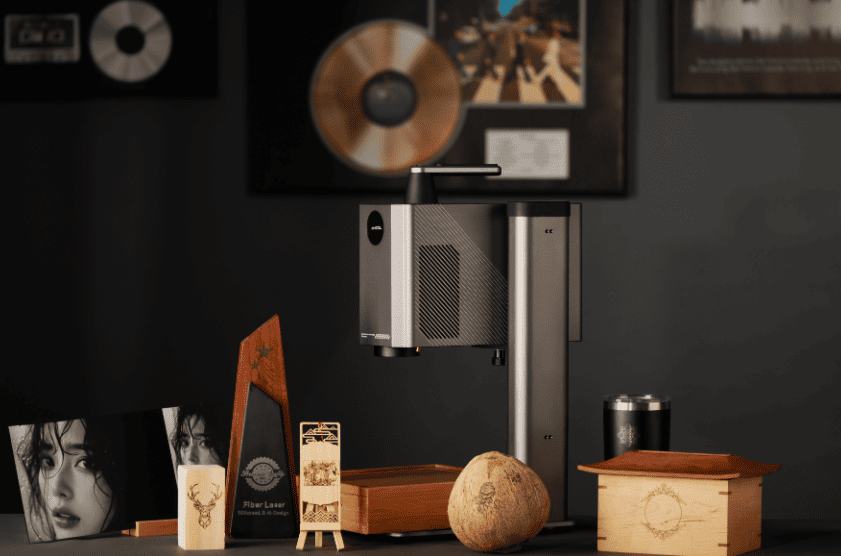
How to Choose the Right Laser Engraving Machine for Pens
Choosing the right laser engraving machine for pens is easier when you follow a clear process. Start with the material, then check the marking area, production volume, fixture, and laser power.
1. Start with the Pen Material
This is the first question. Ask whether the pen is stainless steel, aluminum, brass, coated metal, plastic, wood, painted, plated, or anodized.
| Material | Recommended Direction |
|---|---|
| Metal pens | Fiber laser |
| Coated metal pens | Fiber laser with testing |
| Wood pens | CO2 or diode laser |
| Leather pen cases | CO2 laser |
| Plastic pens | UV laser or sample testing |
| Mixed gift sets | Fiber + CO2 combination |
2. Confirm the Marking Area
A small logo on one side is easy. Long text around the pen body is more complex.
Before choosing the machine, confirm:
- Logo size
- Marking position
- One-side or wraparound design
- Name, logo, serial number, or QR code
- Deep engraving or surface marking
For most business pen orders, surface marking is enough.
3. Check Daily Production Volume
Production volume affects the machine setup. If you only engrave a few pens per day, a basic fixture may be enough. If you engrave hundreds of pens per day, you need better positioning tools, faster workflow, and stable software templates.
| Production Need | Recommended Setup |
|---|---|
| DIY or very small orders | 5W mini fiber laser or basic 20W fiber laser |
| Occasional custom orders | 20W fiber laser + simple fixture |
| Small batch orders | 30W fiber laser + flat pen jig |
| Daily promotional orders | 30W–50W fiber laser + multi-pen fixture |
| Higher-volume production | 50W fiber or MOPA fiber + rotary option |
| Mixed material gift business | Fiber laser + CO2 laser |
4. Decide Whether You Need Rotary Engraving
Do not buy a rotary attachment only because pens are round. Buy it if your marking area requires it.
If the logo is small and placed on one side, a flat fixture may save time. If the text needs to go around the pen, use rotary.
5. Choose the Right Power and Configuration
For common metal pen marking, these fiber laser power options are often used:
| Fiber Laser Power | Suitable Use |
|---|---|
| 5W mini fiber laser | Simple DIY work, small logo marking, and light personalization |
| 20W fiber laser | Basic logo and name marking on metal pens |
| 30W fiber laser | Better speed and flexibility for regular business use |
| 50W fiber laser | Faster marking, deeper marking, and heavier production |
| MOPA fiber laser | Advanced contrast, some color marking, and better control on some metals |
A higher-power machine is not always the better choice. The material, marking effect, lens size, software, fixture, and support also matter.
6. Consider Software, Safety, and Support
For business use, the machine is not the only factor. You also need:
- Easy logo import
- Repeatable templates
- Stable focusing system
- Pen fixture or rotary attachment
- Training support
- Parameter guidance
- Spare parts
- Warranty
- After-sales service
A cheap machine with poor support can cost more in the long run if it causes failed orders or downtime.
Recommended Pen Laser Engraving Machine Setup by Buyer Type
Different buyers need different setups. A small DIY shop and a pen manufacturer should not always buy the same machine.
The right choice depends on pen material, order volume, marking speed, and whether the buyer needs stable batch production.
| Buyer Type | Recommended Setup | Why |
|---|---|---|
| DIY user or small gift shop | 5W mini fiber laser or 20W fiber laser + simple fixture | A small 5W fiber laser can be a low-cost option for simple metal pen marking, names, and small logos. |
| Small custom engraving shop | 20W–30W fiber laser + flat pen fixture | Better for regular name and logo marking on metal pens. |
| Promotional product supplier | 30W–50W fiber laser + multi-pen jig | Better for batch orders, repeatable positioning, and faster daily production. |
| Metal pen manufacturer | 50W fiber laser or MOPA fiber laser + rotary option | More suitable for higher-volume production, deeper marking, and special contrast effects. |
| Custom engraving workshop | Fiber laser + CO2 laser | Covers metal pens, wood gifts, leather cases, acrylic boxes, and other personalized products. |
| Plastic pen supplier | UV laser test recommended | Plastic response varies by material, so sample testing is important. |
For DIY users or very small shops, a compact 5W fiber laser can be a budget-friendly way to start with simple metal pen marking. It is suitable for light personalization work, but it is not the best choice for high-speed production or deeper engraving.
For most buyers who mainly engrave metal pens for business, a 20W–30W fiber laser marking machine with a pen fixture is a more practical starting point. It offers better speed, stability, and flexibility for regular customer orders.
For larger orders, deeper marks, or faster production, a 50W fiber laser may be better. For more advanced contrast on aluminum, stainless steel, or special metal surfaces, a MOPA fiber laser may be worth testing.
Need a machine recommendation? Tell us your pen material, production volume, and logo size. We can recommend a suitable laser system and fixture setup.
Common Mistakes When Buying a Pen Laser Engraving Machine
Mistake 1: Buying a Diode Laser for Bare Metal Pens
A diode laser may mark some coated metal pens, especially if the laser removes the surface coating. But for bare stainless steel, aluminum, or brass pens, a diode laser is not the best choice.
If your business focuses on metal pens, choose a fiber laser.
Mistake 2: Choosing Only by Laser Power
Laser power is important, but it is not the only factor. You also need to consider laser type, material, lens size, marking area, fixture, rotary attachment, software, and support.
A 50W machine is not automatically better than a 30W machine if the setup is wrong for your material.
Mistake 3: Forgetting the Rotary Attachment
Some buyers only think about the laser source. Then they realize later that the pen is round and hard to position.
If you want wraparound engraving, plan for a rotary attachment from the beginning. If you only need one-side logo marking, a good flat jig may be enough.
Mistake 4: Assuming All Plastic Pens Mark the Same Way
Plastic pens can be tricky. One plastic may mark clearly. Another may melt or produce a weak result.
Always test plastic samples before promising a result to your customer.
Mistake 5: Ignoring Batch Positioning
For business use, marking quality is not only about the laser. Repeatability matters.
A good fixture can save time, reduce mistakes, and keep every logo in the same position. For batch pen orders, a simple pen jig can be as important as the laser power.
Safety and Setup Tips for Pen Laser Engraving
Laser engraving is efficient, but safety still matters. Use proper protection and test the settings before production.
| Safety Item | Why It Matters |
|---|---|
| Laser safety glasses or enclosure | Protects the eyes from laser exposure |
| Ventilation | Helps remove smoke or fumes from coatings, plastics, wood, or leather |
| Stable fixture | Prevents pen movement during marking |
| Correct focus | Improves marking quality and reduces failed marks |
| Sample testing | Helps avoid burning, melting, or poor contrast |
| Clean surface | Improves marking consistency |
Follow these basic rules:
- Do not look directly at the laser beam.
- Use the correct safety glasses for your laser wavelength.
- Use ventilation when marking coated pens or plastics.
- Fix the pen firmly before marking.
- Test one sample before engraving a full batch.
- Do not mark unknown plastics without checking the material.
For coated pens, testing is especially important. Some coatings mark cleanly. Others may burn, discolor, or produce fumes.
Is a Laser Engraving Machine for Pens Worth It?
A laser engraving machine for pens can be worth it if you have regular custom orders or want to build a personalization business.
It makes the most sense when you need:
- Permanent logo marking
- Fast name engraving
- Corporate gift customization
- Batch promotional pen orders
- Clean metal pen marking
- Repeatable production
When It Makes Sense
A pen laser engraving machine is a good investment when you sell personalized pens often, receive regular logo marking orders, work with metal pens, or want to expand into other custom metal gifts.
A fiber laser marking machine can also mark many other metal products, such as keychains, nameplates, metal tags, tools, bottle openers, business card holders, stainless steel labels, and small metal gifts. This improves the value of the machine beyond pen engraving.
When It May Not Make Sense Yet
It may not be the right time if you only need hobby engraving, only engrave very low-cost plastic pens, do not have regular orders, or have not tested your pen samples yet.
| ROI Factor | Why It Matters |
|---|---|
| Daily order volume | More orders improve payback speed |
| Pen material | Metal pens often justify fiber laser investment |
| Fixture setup | Faster positioning saves labor |
| Product range | The machine can also mark other metal gifts |
| Marking quality | Clean results reduce rejected orders |
| Support and training | Helps avoid downtime and poor settings |
If you plan to engrave pens for business, do not choose only by price. Choose the system that fits your real production needs.
FAQ About Laser Engraving Machines for Pens
What is the best laser engraving machine for pens?
For metal pens, a fiber laser marking machine is usually the best choice. It can mark stainless steel, aluminum, brass, coated metal, and anodized aluminum pens. For wood pens, leather cases, or acrylic boxes, a CO2 laser may be better. Plastic pens need sample testing.
Can you laser engrave metal pens?
Yes. Metal pens can usually be marked with a fiber laser. This includes stainless steel, aluminum, brass, coated metal, and anodized aluminum pens. For coated metal pens, the laser often removes the surface coating to reveal the base layer.
Do I need a rotary attachment to engrave pens?
Not always. If you only need a logo or name on one side of the pen, a flat fixture may be enough. If you need full-wrap engraving or long text around the pen body, a rotary attachment is better.
What power do I need for metal pen engraving?
For very simple DIY metal pen marking, a 5W mini fiber laser may work. For regular business use, 20W–30W fiber laser is usually more practical. For faster production, deeper marking, or larger batch orders, 50W fiber laser may be better.
How much does a laser engraving machine for pens cost?
The cost depends on laser type, power, fixture, and production needs. A small 5W mini fiber laser may cost only a few hundred dollars, while a 20W–50W fiber laser marking machine is more suitable for regular business use. Compare material, marking speed, fixture quality, and support instead of price alone.
Final Buying Checklist: What to Send Before Getting a Quote
Before choosing a laser engraving machine for pens, prepare these details.
| Information to Send | Example |
|---|---|
| Pen material | Stainless steel, aluminum, coated metal, plastic, wood |
| Pen photos | Front view and side view |
| Logo or text file | AI, SVG, DXF, PNG, or clear image |
| Marking size | 20 × 5 mm |
| Marking position | One side or around the pen |
| Required effect | Black mark, white mark, coating removal, deep engraving |
| Daily quantity | 50 pcs/day, 200 pcs/day, 1,000 pcs/day |
| Pen diameter | Example: 10 mm |
| Need rotary? | Yes, no, or not sure |
| Target use | Gift shop, promotional products, factory production |
The best machine is not always the most powerful machine. It is the machine that matches your material, marking effect, and production workflow.
For most metal pen engraving businesses, a fiber laser marking machine with the right fixture is the best starting point. For mixed gift products, you may need both fiber and CO2 laser systems.
Need help choosing a laser engraving machine for pens? Send us your pen material, logo size, marking position, and daily production quantity. Our team can recommend the right laser type, power, and fixture setup for your application.