
A UV laser marking machine for optical lenses can mark many CR-39, polycarbonate, glass, and coated lenses with fine, low-heat surface marking. It is often a better starting point than CO₂ or fiber laser marking when the lens material is transparent, coated, or sensitive to heat.
However, not every optical lens reacts the same way. The final result depends on the lens material, coating type, marking size, marking position, fixture stability, and laser parameters. For coated lenses and blue cut lenses, sample testing is strongly recommended before purchase or batch production.
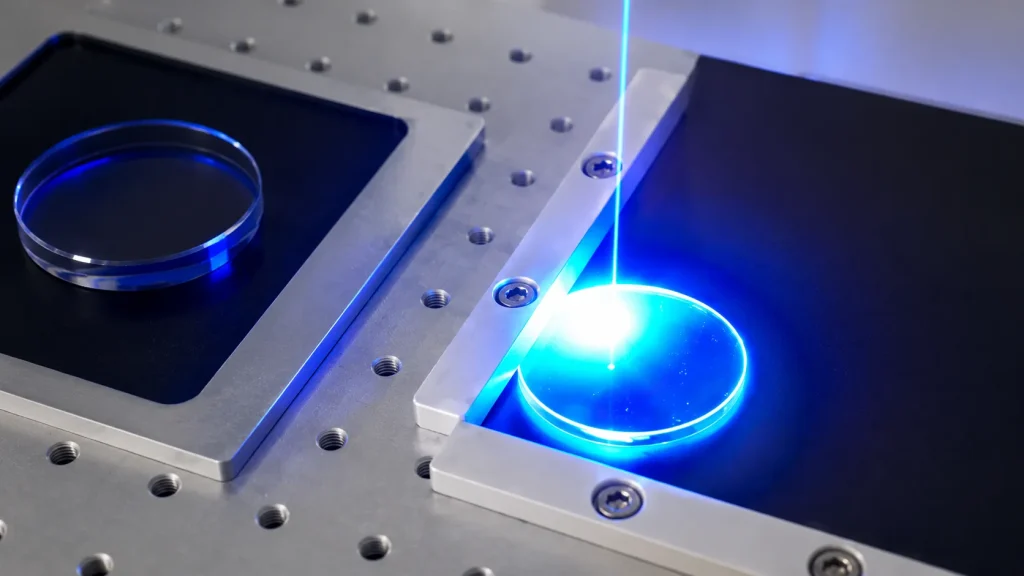
Quick Answer
A UV laser marking machine can mark many optical lenses, including CR-39, polycarbonate, and some coated lenses. A 355nm UV laser is commonly used because it can create fine marks with low heat impact. But coated and blue cut lenses should be tested first because different coatings can react differently to laser energy.
If you need to mark logos, ID codes, QR codes, or anti-counterfeit marks on optical lenses, the safest first step is to request a real sample marking test. This helps confirm the mark quality before you choose the machine.
Can a UV Laser Marking Machine Mark Optical Lenses Safely?
Yes, a UV laser marking machine can mark many optical lenses when the correct settings are used. It is suitable for small logos, lens ID marks, traceability codes, demo lens branding, anti-counterfeit marks, and small QR or Data Matrix codes.
The key point is control. Optical lens marking is not the same as marking ordinary plastic. A lens must stay clear, smooth, and free from visible damage in the useful viewing area.
For buyers who need fine marking on plastic, glass, or coated surfaces, a UV laser marking machine for fine plastic and glass marking is usually the first machine type to test.
A CR-39 lens, a polycarbonate lens, and a coated blue cut lens may need different laser settings. That is why a supplier should not only say, “Yes, it can mark lenses.” They should be able to provide a real marking test on the same or similar lens material.
Why 355nm UV Laser Is Used for Optical Lens Marking
Most UV laser marking machines use a 355nm UV wavelength. This short wavelength allows the laser energy to interact with the surface in a more controlled way. It can create fine marks with less heat impact than many thermal marking methods.
This is why UV laser marking is often called cold marking. Keyence explains that UV laser marking can reduce heat-affected zones and is often used for plastics, glass, resin, rubber, ceramics, and other sensitive materials. You can learn more from this external guide on UV laser marking and cold marking.
For optical lenses, low heat matters because many lens materials and coatings can be damaged by excess heat. If the laser energy is too strong or stays too long in one area, the lens may show haze, yellowing, cracks, or coating damage.
A 355nm UV laser is useful for lens marking because it offers:
- Fine marking detail
- Small focused spot
- Low heat impact
- Better control on plastics and transparent materials
- Cleaner marks on delicate surfaces
- Lower risk of burning when parameters are correct
The goal is usually not deep engraving. The goal is a clean, controlled mark that does not affect the useful optical area. For more background on laser sources, you can also review Riselaser’s laser source options.
What Optical Lens Materials Can Be Marked by UV Laser?
Different lens materials need different marking tests. The machine may be the same, but the settings should not always be the same.
| Lens Material | UV Laser Suitability | Main Risk | Testing Recommendation |
|---|---|---|---|
| CR-39 lenses | Good candidate | Cracking, stress, or low contrast if settings are wrong | Test mark size, position, and depth |
| Polycarbonate lenses | Good candidate, but heat-sensitive | Haze, yellowing, deformation, or burning | Use low-heat settings and test first |
| Coated lenses | Possible, but coating-dependent | Coating peeling, color change, or uneven contrast | Always test the exact coating |
| Blue cut lenses | Possible, but varies by coating | Weak visibility or coating reaction | Test under real lighting |
| Glass lenses | Possible for some marks | Low contrast or surface stress | Test before production |
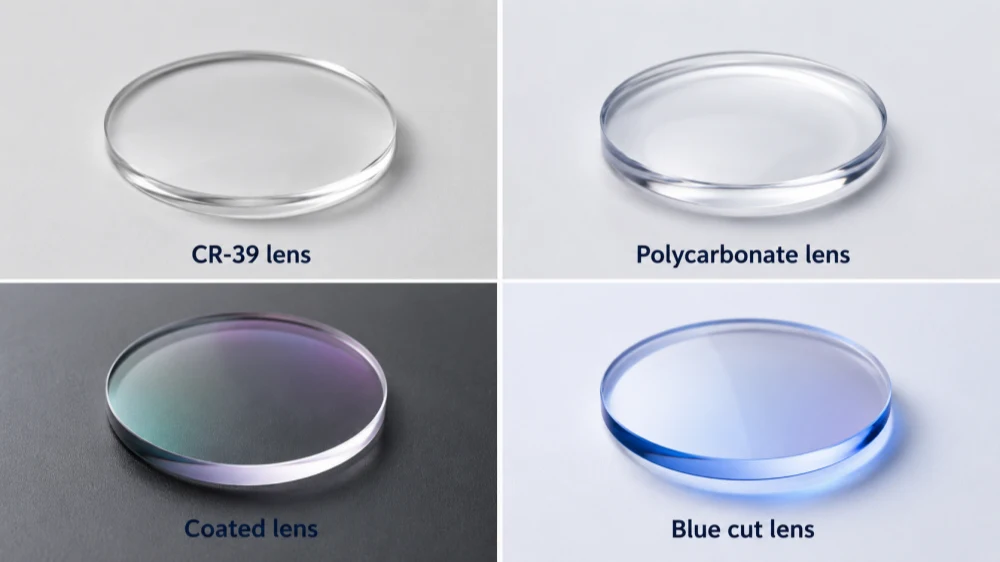
CR-39 Lens Laser Marking
CR-39 is common in prescription eyewear. It is lightweight and has good optical clarity. A UV laser marker can be a good option for CR-39 lens marking, especially for small and shallow marks.
Common CR-39 lens marking applications include:
- Brand logos
- Small ID marks
- Lab codes
- Anti-counterfeit marks
- Data Matrix codes
However, CR-39 lenses can be uncoated, hard-coated, tinted, or treated with other surface layers. These details can change the final result. A real sample test is still necessary before batch marking.
Polycarbonate Lens Laser Marking
Polycarbonate lenses are strong and lightweight, but they are also heat-sensitive. A UV laser is often preferred for polycarbonate lens marking because it can reduce heat impact compared with more thermal laser types.
For polycarbonate lenses, check these settings carefully:
- Laser power
- Marking speed
- Pulse frequency
- Focus position
- Number of passes
- Lens support fixture
For optical lenses, the darkest mark is not always the best mark. A clean, stable, low-damage mark is usually better than a deep mark.
Coated and Blue Cut Lens Laser Marking
Coated lenses need the most careful testing. A coated lens may include an anti-reflective coating, hard coating, anti-scratch coating, blue cut coating, tinted coating, mirror coating, or UV protection coating.
When marking coated lenses, the laser may react with the coating instead of the base lens material. This can create a clear mark, but it can also cause peeling, color change, weak contrast, or visible surface damage.
Practical rule: Do not assume all coated lenses can be marked the same way. Test the exact coating before batch production.
For blue cut lenses, check the mark under real lighting. Some marks look clear from one angle but weak from another.
Sample UV Laser Marking Results on Optical Lenses
A strong sample test is one of the best ways to prove whether a UV laser marking machine is suitable for your optical lens application.
For a useful sample result, ask the supplier to show:
- The original lens before marking
- The marking process
- A close-up view after marking
- The mark under normal light
- The mark under side light
- The lens surface after cleaning
- Whether there is burning, haze, cracking, or coating peeling
If you are comparing suppliers, do not rely only on general machine photos. A good test should use the same lens material or a very similar sample. This is especially important for coated, tinted, and blue cut lenses.
Recommended CTA: Send your lens material, coating type, marking size, and sample photos. We can check whether UV laser marking is suitable and provide a real marking test video before you buy.
Will UV Laser Marking Burn, Crack, or Damage Optical Lenses?
UV laser marking can reduce heat risk, but it does not remove all risk. A lens can still be damaged if the settings are wrong.
Common problems include burning, haze, cracking, coating peeling, and poor contrast.
| Risk | Possible Cause | How to Reduce It |
|---|---|---|
| Burning | Too much energy in one area | Lower power, faster speed, optimized frequency |
| Cracking | Heat stress, lens stress, or poor support | Use low-heat parameters and stable fixturing |
| Haze or yellowing | Heat buildup or wrong settings | Reduce exposure and test different parameters |
| Coating peeling | Coating reacts badly to laser energy | Test the exact coating first |
| Poor contrast | Material does not absorb the laser well | Adjust focus, speed, power, or mark position |
| Distorted mark | Curved lens is not positioned well | Use a proper lens fixture |
A good test should confirm the lens material, coating type, marking size, marking position, close-up result, and surface condition after marking. For optical lens applications, this proof is more useful than a general product claim.
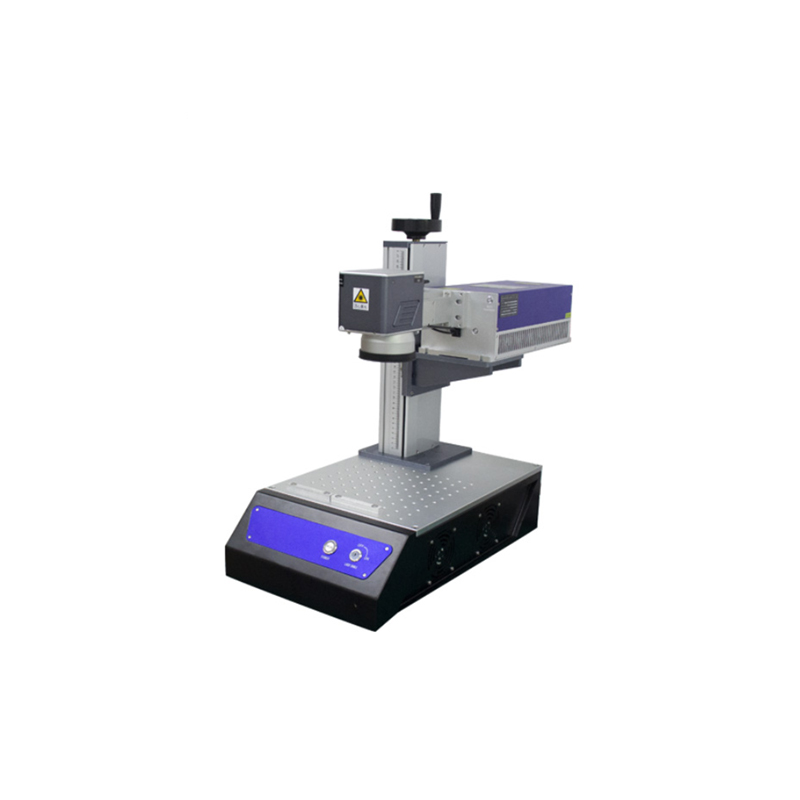
UV Laser vs CO₂ vs Fiber Laser for Eyeglass Lens Marking
UV, CO₂, and fiber lasers are not the same. They use different wavelengths and interact with materials differently.
For eyeglass lens marking, UV laser is usually the first choice to test because it is better suited for fine, low-heat marking on plastics, coated surfaces, and transparent materials. LASIT also discusses UV and CO₂ laser use in the eyewear industry, including a CR-39 lens Data Matrix marking example. You can review their external case study on UV laser marking vs CO₂ in eyewear.
| Laser Type | Best For | Lens Marking Suitability | Main Concern |
|---|---|---|---|
| UV laser | Fine marking on plastics, glass, coated surfaces, and delicate parts | Best general choice for optical lens testing | Needs correct parameters |
| CO₂ laser | Acrylic, wood, paper, leather, some plastics, and some frame materials | Possible for some non-lens eyewear parts | More heat risk on transparent or delicate lenses |
| Fiber laser | Metals, stainless steel, aluminum, and some hard plastics | Usually not the first choice for optical plastic lenses | Can create too much heat on many lens materials |
CO₂ lasers can still be useful for some eyewear frame materials. Fiber lasers are excellent for metal parts. But for CR-39, polycarbonate, and coated optical lenses, UV laser marking is usually the safer starting point.
If you are still comparing laser types, Riselaser’s guide on CO₂ vs fiber vs UV laser markers can help you understand the main differences.
Is 5W UV Laser Enough for Optical Lens Marking?
For many optical lens marking jobs, 5W UV laser power is enough. A 5W UV laser marker is commonly used for fine marks, small logos, and codes on plastics and delicate materials.
But higher power is not always better for optical lenses. Too much power can increase the risk of heat buildup, haze, burning, coating damage, or poor surface quality.
The better question is not only, “Is 5W enough?”
Better question: Can this UV laser machine mark my exact lens material clearly, safely, and at the speed I need?
| UV Laser Power | Best Fit | Notes |
|---|---|---|
| 3W UV | Light and fine marking | Good for small marks, but slower |
| 5W UV | Common optical lens marking tests | Balanced option for optical shops and lens labs |
| 10W UV | Higher throughput or larger marks | Needs careful parameter control |
For most optical shops, 5W UV is usually a practical starting point for small logos, ID marks, and fine codes. For factories that need faster cycle time or larger marks, 10W may be considered, but only after sample testing confirms that the higher power does not damage the lens or coating.
Recommended UV Laser Marking Machine Configuration for Optical Shops
If you are buying a UV laser marking machine for an optical shop, the machine should be precise, stable, and easy to operate. It should also support safe operation in a retail or lab environment.
| Configuration | Recommendation for Optical Lens Marking |
|---|---|
| Laser type | 355nm UV laser |
| Power | 3W or 5W for fine lens marking; 10W for higher speed after testing |
| Machine type | Desktop or enclosed UV laser marker |
| Fixture | Custom lens holder for curved lenses |
| Cooling | Air or water cooling depending on power and working time |
| Software | Support logos, text, serial numbers, QR codes, and Data Matrix codes |
| Safety | Enclosure, interlock, laser safety glasses, and fume extraction if needed |
For buyers comparing different models, you can also review Riselaser’s full range of industrial laser marking machines.
What Marking Quality Should Optical Shops Expect?
A good UV laser mark on an optical lens should be clean, sharp, and easy to inspect. Depending on the lens material and coating, the mark may look light gray, frosted, white, subtle, high-contrast, or visible only at certain angles.
In many optical applications, a subtle mark is acceptable or even preferred. The mark should not interfere with the useful vision area.
| Application | Example Mark | Best Marking Position |
|---|---|---|
| Optical shop branding | Small shop logo | Lens edge or non-vision area |
| Eyewear brand mark | Logo on demo or sunglass lens | Corner or branded area |
| Lens lab traceability | Small ID code | Edge or hidden area |
| Anti-counterfeit mark | Micro text or code | Non-critical optical area |
| Data Matrix code | Small 2D code | Area tested for readability |
A deeper mark is not always better. For optical lenses, controlled surface marking is usually better than aggressive engraving.
What Should a Real Lens Marking Test Video Show?
A real sample video is one of the best ways to reduce purchase risk. Before buying a UV laser marking machine for optical lenses, ask the supplier to test a similar lens or your actual sample.
| Test Item | Why It Matters |
|---|---|
| Lens material | CR-39, polycarbonate, glass, and coated lenses react differently |
| Coating type | The coating may be the real marking surface |
| Marking content | Logo, text, QR code, or Data Matrix may require different settings |
| Marking size | Small marks need higher precision |
| Marking position | Curved surfaces and lens edges need stable positioning |
| Close-up result | Shows contrast, sharpness, and surface quality |
| Lighting angles | Some marks only appear clearly from certain angles |
| Damage check | Confirms no burning, cracking, haze, or peeling |
| Machine configuration | Shows power, fixture, work area, and setup |
A useful test video should show more than the laser moving. It should show the final marked lens clearly.
The best sample video includes the lens before marking, the marking process, a close-up after marking, side-angle inspection, surface check under light, and the final result next to the original lens.
Key Specifications to Check Before Buying a UV Laser Marking Machine for Optical Lenses
Do not compare UV laser marking machines only by price. For lens marking, stability, precision, safety, and support matter.
| Specification | Why It Matters for Lens Marking |
|---|---|
| 355nm UV wavelength | Helps with fine, low-heat marking |
| Laser source brand | Affects stability and service life |
| Laser power | Impacts marking speed and application range |
| Spot size | Controls detail and mark sharpness |
| Galvanometer scanner | Affects marking speed and accuracy |
| Cooling system | Helps maintain stable performance |
| Work area | Must fit your lens size and fixture |
| Lens fixture | Keeps curved lenses stable |
| Software | Supports logos, text, serial numbers, QR codes, and Data Matrix codes |
| Safety enclosure | Protects operators from laser exposure |
| Fume extraction | Helps remove smoke or odor from plastic marking |
| Warranty | Reduces purchase risk |
| After-sales support | Helps with setup, training, and parameters |
For optical lens marking, the fixture is very important. A flat product is easy to mark. A curved lens is harder. If the lens moves, tilts, or sits at the wrong focal distance, the mark may become blurry or uneven.
Safety Notes for Optical Shops and Lens Labs
A UV laser marking machine is industrial equipment. It should not be treated like a normal office printer.
Industrial laser systems can create eye, skin, reflection, and fire risks if used incorrectly. OSHA notes that Class IV lasers can create immediate eye and skin hazards from direct or reflected beams and may also present a fire hazard. You can review OSHA’s external laser safety information here: OSHA laser hazards.
For optical shops and lens labs, basic safety should include:
- Use a protective enclosure when possible
- Avoid open-beam operation
- Use correct laser safety glasses when required
- Keep customers away from the marking area
- Train operators before use
- Use fume extraction when marking plastics
- Keep flammable materials away from the laser area
- Follow the machine supplier’s safety instructions
If the machine will be used in a retail optical shop, safety design is even more important because staff and customers may be nearby.
ROI: When Does a UV Laser Marker Make Sense for an Optical Business?
A UV laser marker makes sense when lens marking supports your daily business, branding, production workflow, or sample development.
It may be useful if you need:
- In-house lens customization
- Small logo marking
- Demo lens branding
- Anti-counterfeit marking
- Serial number or batch code marking
- Faster sample development
- Less outsourcing
- More control over production timing
| Business Type | Why It Makes Sense | Best Use Case |
|---|---|---|
| Optical shop | Adds in-house customization | Logo or ID marks on lenses |
| Lens lab | Improves traceability | Batch codes or technical marks |
| Eyewear brand | Supports branding | Logo marks on demo or sunglass lenses |
| Distributor | Expands application market | Selling UV markers to optical clients |
| Small manufacturer | Reduces outsourcing | Short-run lens or frame marking |
A UV laser marker may not be necessary if you only mark lenses once in a while. But if you mark lenses regularly, test new designs, or offer premium customization, in-house marking can save time and give you more control.
To compare budget levels for different marking systems, you can read Riselaser’s guide on laser marking machine cost.
Price, Shipping, Warranty, and After-Sales Support
The price of a UV laser marking machine for optical lenses depends on the machine configuration.
Main price factors include:
- UV laser power, such as 3W, 5W, or 10W
- Laser source brand
- Marking area
- Cooling system
- Safety enclosure
- Lens fixture
- Software functions
- Fume extraction
- Shipping country
- Warranty and support package
For international buyers, always ask for the full cost, not only the machine price. The quotation should include machine configuration, shipping cost, delivery time, warranty, training method, and after-sales support.
Before You Buy: Questions to Ask Your Supplier
Before ordering a UV laser marking machine for optical lenses, ask practical questions that prove the supplier understands your application.
| Question | Why It Matters |
|---|---|
| Can you test my actual lens material? | Confirms real marking compatibility |
| Can you show close-up marking videos? | Helps check cracks, haze, and coating damage |
| What UV laser power do you recommend? | Avoids choosing the wrong power |
| Is a lens fixture included? | Improves marking stability on curved lenses |
| Is the machine enclosed? | Improves operator safety |
| What software is included? | Affects logo, text, serial number, QR code, and Data Matrix marking |
| What warranty and support are included? | Reduces after-sales risk |
| What is the shipping cost to my country? | Gives a more accurate landed cost |
For lens applications, confirm the marking result before focusing only on price.
How to Choose the Right UV Laser Marking Machine for Optical Lenses
Use this simple process before buying:
- Confirm the lens material. Is it CR-39, polycarbonate, glass, or another material?
- Confirm the coating type. Is it hard-coated, anti-reflective, blue cut, tinted, or mirror-coated?
- Define the marking content. Do you need a logo, text, QR code, Data Matrix, serial number, or small ID mark?
- Choose the marking position. Will the mark be on the edge, corner, demo lens area, or non-vision area?
- Confirm the marking size. Small marks need better focus and higher precision.
- Request a sample test. Ask for a real video and close-up result.
- Check the machine configuration. Review laser power, source, spot size, cooling, software, and work area.
- Check the fixture. Curved lenses need stable positioning.
- Review safety design. Enclosure and operator protection matter.
- Confirm warranty and support. Good support helps you solve setup and parameter issues faster.
This process helps you avoid buying a machine that looks good on paper but fails on your actual lens material.
FAQ About UV Laser Marking Machines for Optical Lenses
Yes. A UV laser marking machine can mark many optical lenses, including CR-39, polycarbonate, and some coated lenses. The result depends on the lens material, coating type, and laser settings.
UV laser marking can be suitable for CR-39 lenses when the parameters are optimized. A sample test is recommended before production, especially if the lens has a coating.
Yes, UV laser marking can mark polycarbonate with lower heat impact than many other laser types. But wrong settings can still cause haze, burning, or deformation, so testing is important.
It can mark some coated or blue cut lenses, but results vary by coating type. Always test the exact coating before buying the machine or marking customer lenses.
For many fine lens marking tasks, 5W UV is enough. However, the right power depends on mark size, marking speed, material, coating, and production volume.
Send the lens material, coating type, marking size, marking position, logo or code file, photos of the lens, and your country for shipping quotation.
Request a UV Laser Marking Test for Your Optical Lenses
Need to mark CR-39, polycarbonate, coated, or blue cut lenses?
Send us your lens material, coating type, marking size, logo file, and sample photos. We can recommend the right UV laser marking machine and provide a real marking test video before you buy.